
The website is built, the design is approved and all that’s left is to “put it live”. This is exactly the moment when businesses lose quote requests for weeks without anyone noticing: the form that sends to an old email address, the page that only looks right on the designer’s computer, Google still showing the old site.
None of this is hard to avoid. It just has to be checked before, not after. This is the list we use — you can use it with any supplier.
1. Content: read everything as if you were a customer
It sounds obvious, but it’s the step most often skipped. Open every page and read it from top to bottom.
- Placeholder text. Look for “Lorem ipsum”, “text here”, “Service title”. It shows up more often than you’d think.
- Correct contact details. Email, phone, address and opening hours identical on every page, in the footer and on your Google Business Profile.
- Dates and prices. Promotions that have already ended, the wrong year in the footer, prices without VAT information.
- Image rights. Are stock photos licensed? Did your team agree to their photos being used?
- Typos. Ask someone who wasn’t involved in the project to read it. Whoever wrote it no longer sees the mistakes.
2. Forms and contact: test with real data
A form that doesn’t work is worse than no form at all — the customer thinks they’ve contacted you and you never find out.
- Send a test request from every form on the site.
- Check that the email reaches the right inbox and doesn’t land in spam.
- Reply to that email and check the reply goes to the customer’s address, not back to the website.
- Test the phone and WhatsApp buttons from a mobile phone.
- If there’s a confirmation message (“Thanks, we’ll reply within 24 hours”), make sure it shows up — and that it’s true.
After launch, repeat the test every now and then. A change to your email or hosting can break the form without warning.
3. Mobile: that’s where most visits are
“It opens on my phone and looks fine” isn’t enough. Try using the site like a customer in a hurry:
- Does the menu open and close easily?
- Are the buttons big enough for a finger?
- Can you read the text without zooming?
- Does anything make you scroll sideways?
- Does the homepage load quickly on mobile data, not just on the office Wi-Fi?
Test on at least one Android phone and one iPhone.
4. Speed and technical checks
You don’t need to understand code to do these:
- Speed. Run your homepage through an analysis tool (you can use our website check). If the mobile score is low, the most common causes are oversized images and too much code.
- HTTPS. The site opens with the padlock, with and without “www”, and the old
http://address redirects to the new one. - Links. Click every item in the menu and footer. Broken links cost you trust and Google rankings.
- Error page. Type an address that doesn’t exist and see what appears. There should be a friendly page with a way back.
- Favicon and sharing. Does the icon show in the browser tab? When you share the link on WhatsApp or LinkedIn, do you get a decent image and title?
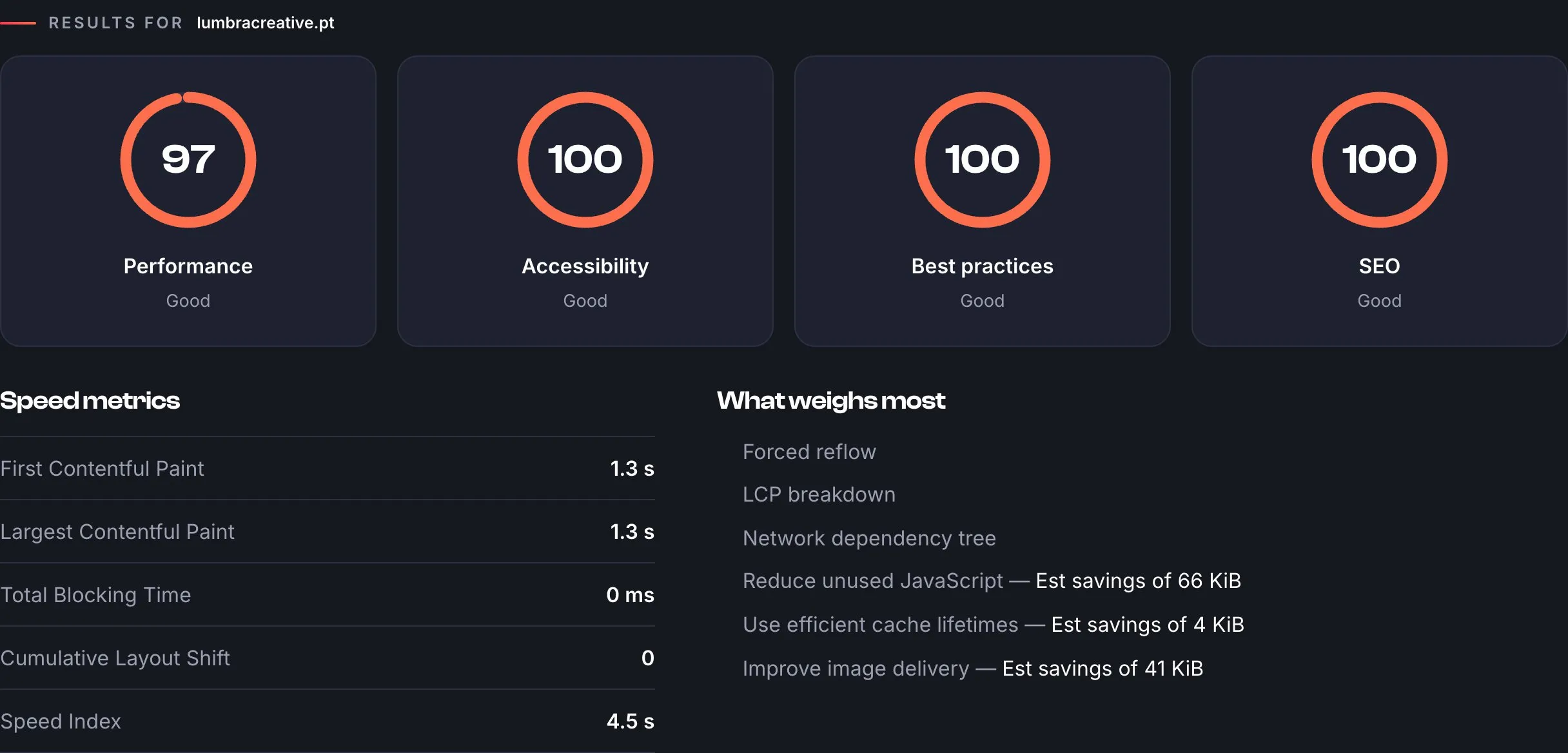
Our own website in the website check: scores, speed metrics and what could still be fine-tuned.
5. Google: don’t leave your new site in the dark
If you’re replacing an old website, this is the point that costs the most money when it goes wrong.
- Redirects. Every old address that used to get visits must point to the equivalent page on the new site. Without this, Google and anyone with a saved link will hit error pages.
- Titles and descriptions. Every page has its own title and description, written for people and not just for Google.
- Indexing. Make sure the site isn’t blocked from search engines — it happens when someone forgets to switch off “under construction” mode.
- Search Console. Register the site in Google Search Console and submit the sitemap. It’s free, and it’s how you find out whether Google sees the site the way it should.
6. Legal and ownership
- An up-to-date privacy policy, especially if your form collects personal data.
- A cookie banner only if you use cookies that require one. If your site doesn’t use them, even better: one less obstacle for visitors.
- Any consumer-complaint information your sector is legally required to display.
- Make sure the domain is in your name and that you have access to the hosting. If your supplier disappears, the website must still be yours.
7. After launch: the first week
Launch isn’t the finish line. In the first few days:
- Test the form again with the site on its final address.
- Check Search Console for “page not found” errors and add any missing redirects.
- Ask two or three trusted customers to use the site and tell you what felt odd.
- Agree with whoever built the site on who handles updates, backups and small changes from now on.
This list fits into an afternoon. That’s far less time than you lose discovering, three months later, that the requests weren’t coming in.
Already have a website live and want to know how it’s doing? Run a quick website check or see what’s included in our services. If you’d rather have someone go through it with you, get in touch.